 Spotwise Energy
At a glance: is electricity cheap right now?
The “now” card instantly shows the current price, whether it is cheap or expensive, and when today’s cheapest and most expensive hours are.
Spotwise Energy shows you the current electricity prices (spot prices) for Austria and tells you when it pays most to run your washing machine or dishwasher, or to charge your EV.
With a dynamic electricity tariff (spot tariff) you pay the exchange price, and it changes all the time. Use power at the right time and you save.
The day-ahead price is set for every quarter hour of the day. Spotwise Energy shows you all of them at a glance.
Prices for the next day are fixed the day before. So you can decide in the evening when your washing machine should run.
When there is a lot of solar or wind power in the grid, prices often drop sharply. They are usually highest in the evening.
Spotwise Energy shows not only when power is cheap but also when it is cleanest: for every hour of today and tomorrow, how much of Austria’s power comes from hydro, wind, solar and biomass.
Clear, fast and just as good on your phone as on your computer.
The “now” card instantly shows the current price, whether it is cheap or expensive, and when today’s cheapest and most expensive hours are.
A small touch display shows the price, the chart and the best times for your appliances, no phone needed. Set it up and design it on your computer, then it runs on its own over Wi-Fi.
Learn moreA colour-coded chart shows the whole day in quarter hours. Tap the chart to enlarge it and read every single price.
Add your appliances with their run time. Spotwise Energy finds the cheapest time window and suggests alternatives if you like.
When prices get especially cheap or expensive, at the greenest hour of the day, when your washing machine should start or when tomorrow’s prices are out. You choose what you get, with quiet hours for the night.
NewTap “Started” when an appliance runs. The app works out what you saved compared to the daily average and adds it up per month, per appliance and with milestones. You also see how much renewable power your appliances ran on and how much CO₂ you saved compared with the day’s average. Save it all as a monthly report in PDF or CSV.
NewShare your appliances with the people you live with: send an invite link, done. Everyone sees the same appliances and recommendations; theme and notifications stay personal.
FamilyPick your dynamic tariff, such as aWATTar HOURLY or smartENERGY smartCONTROL, or enter your own, plus your grid area: the app adds grid fees and levies as set by regulation. It then shows what you really pay per kWh.
NewEnter your charging power and daily charging need. If you like, charging during the day is avoided while the car is away from home.
ProHow have prices developed? Your personal statistics start with your account and show days, weeks, months and years, including the typical daily profile.
Add your annual bill as a PDF: the app reads the period, consumption, amount and supplier and shows what a kWh really cost you. From two bills on you see the trend, spot and fixed tariffs side by side. The tariff comparison works out what a fixed-price offer would have cost you last year. The PDF is only read on your device and never stored.
NewWhen the exchange price drops below zero, the app shows it clearly and can let you know the day before. Ideal for your EV, water heater and washing machine.
NewWhy is power expensive or cheap today? The app explains it every day with real data: wind and sun in Austria and Germany, weekends and public holidays, and why it is cheap at midday and dear in the evening.
See today NewOfficial prices only come out the day before. From the wind and solar forecast the app estimates earlier whether a day will be cheaper or dearer and when it will probably be cheapest.
NewDoes feeding in or using your own power pay more right now? The app warns when feeding in costs money at negative prices and checks whether charging your battery from the grid pays off.
NewThe spot tariff calculator compares your current tariff with aWATTar HOURLY, smartENERGY and others, using real exchange prices. Also with your electricity bill as a PDF, no account needed.
Open the calculator NewShare the price of the day or your savings as a picture, e.g. on WhatsApp or Instagram. In December and January you get your personal year in review.
NewOne tap and the cheapest start for your appliance is in your calendar with a reminder, no smart home needed.
NewThe current electricity price is also on our page “Electricity price today”, without the app, and as a free widget for your own website.
Electricity price today NewOpen it from your home screen, with light and dark themes, in English and German. With a free account your data is the same on phone and computer.
You see the prices right away. For personal recommendations you only need a few details.
Open app.spotwise-energy.com in your browser. Under “Prices” you immediately see the current electricity price and today’s chart.
Tip: add the app to your home screen and it’s always just a tap away.
Sign up with email or your Google account so your appliances and settings are backed up and available on all your devices.
Under “Electricity tariff”, pick your dynamic tariff or enter your own markup. Your grid area adds grid fees and levies, so you see real final prices. Under “Default operating hours” you set the earliest and latest times your appliances may run.
Add appliances such as a washing machine or dishwasher with consumption and run time, and turn on “Show recommendation”. Up to 5 appliances are free; for your electric car there is EV mode with Pro.
Under “Prices” you see the cheapest time window for each appliance. Don’t like the time? The app shows you an alternative. Tap “Started” when the appliance runs and the app counts your savings.
Get reminded when prices turn cheap or an appliance should start. On iPhone this works once the app is added to the home screen. If you live with others, invite them under “Household”.
Spotwise Energy is a web app. Simply add it to your home screen and it opens full screen like any other app.
Works on iPhone and iPad.
From iOS 16.4 this also works with other browsers.
The default browser on most Android phones.
The browser on many Samsung phones.
Works on a computer too: in Chrome or Edge, click the install icon on the right of the address bar.
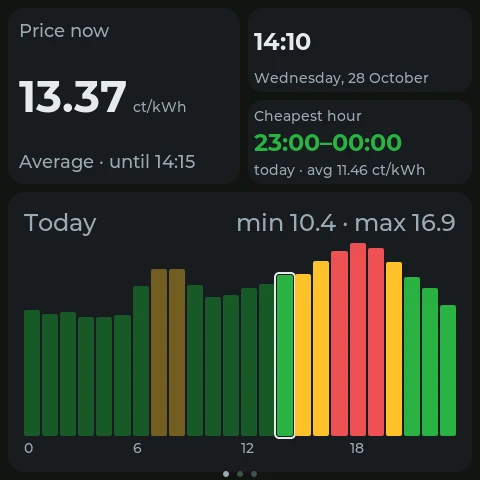
A small touch display in the kitchen or hallway shows you at any time whether electricity is cheap and when your appliances should run. No phone needed.
All with touch and an ESP32-S3 with 16 MB flash and 8 MB PSRAM; the configurator checks this before installing. For Sunton only the “C” version with capacitive touch. Beta means: the display is supported, but not yet tested on the real device. If you own one, we’d love to hear how it works for you at [email protected]. The Waveshare 800 × 480 displays and the Makerfabs 7″ cannot dim their backlight, only switch it on and off. The configurator runs in Chrome or Edge on a computer.
For most people the free version is enough. Pro is for anyone charging an EV or wanting deeper insights, Family for anyone living with others.
Be there from the start: join now and get all Pro features for free. Just request it in the app with your free account and we unlock Pro by hand. No payment details and no subscription: Pro ends automatically and you continue for free.
Everything in Free, plus:
Everything in Pro, plus:
Statistics start on the day you create your account.
The app is free, with up to 5 appliances, notifications, the savings counter, statistics for the last 30 days, up to 2 electricity bills and one display. Coming soon: Pro with unlimited appliances and bills, up to 10 displays, EV mode, up to 10 years of statistics and the savings history, for €2.49 per month or €19.99 per year, and Family with everything in Pro plus your own household for up to 5 people, for €4.49 per month or €35.99 per year. More in the comparison above.
Yes, with the display configurator. You need a supported display, a USB cable and Chrome or Edge on a computer. The Waveshare ESP32-S3-Touch-LCD-4B is tested; the Waveshare models 4, 4.3, 4.3B, 5 and 7 as well as displays from Sunton/Guition and Makerfabs are in beta, meaning supported but not yet tried on the real device (list above). The configurator installs the software on the display, sets up Wi-Fi and connects it to your free account. You design your screens by drag and drop and can change them at any time; the display fetches changes over Wi-Fi. The Wi-Fi password only goes to the display over USB. For the price chart you choose the resolution in the widget settings: “Hours” shows the average of each hour as 24 wide bars, “Quarter hours” all 96 prices of the day like the app. The big “Price now” number is always the price of the current quarter hour, so with “Hours” it can differ slightly from the highlighted bar. With the free account you connect one display, with Pro or Family up to 10; members of a Family household also get up to 10. The display may only read what it shows, and you can remove it at any time to free up the slot. More in the privacy policy.
Everyone who joins early gets Pro for free, up to and including 1 June 2027. Create a free account in the app and tap “Request for free” under Settings → Account. We then unlock Pro for your account by hand, which you see right in the app. You give no payment details and take out no subscription: Pro ends automatically, then you keep using the app for free and your data stays. For the request we only store your account email, more in the privacy policy.
The prices are the day-ahead exchange prices for Austria from the ENTSO-E Transparency Platform, the association of European transmission system operators. They are updated automatically. All information without guarantee.
You only save money directly with a tariff based on the exchange price. But the app helps with a fixed-price tariff too: using power when it is cheap usually also means using it when there is a lot of solar and wind power in the grid.
For households in Austria that want to use electricity when it is cheap: above all with a dynamic electricity tariff (spot tariff), where you pay the exchange price per quarter hour or hour. It pays off most for appliances whose start time you can choose freely, such as a washing machine, dishwasher, water heater or charging an EV. If you still have a fixed-price tariff, the free spot tariff calculator shows whether switching would pay off.
aWATTar HOURLY, smartENERGY smartCONTROL, oekostrom oeko Spot+ and Energie AG Ökostrom Spot are built in as presets. For any other dynamic tariff you simply enter the markup, monthly fee and VAT yourself. With your grid area the app also adds grid fees and levies as set by regulation, so you see what you really pay per kWh.
The free spot tariff calculator works it out: enter your consumption and current energy price or read your electricity bill as a PDF, and you see roughly what you would pay a year with a dynamic tariff such as aWATTar HOURLY or smartENERGY smartCONTROL. It uses real exchange prices. The calculator is in the app under “Prices” and works without an account.
Yes. When you enter your solar system in the settings (feed-in at the market price or a fixed price, optionally your home battery), the price page shows whether using your own power or feeding in pays more, warns when feeding in costs money at negative prices and checks whether charging the battery from the grid pays off.
Official prices are always published the day before at around 1 pm. For the days after that Spotwise Energy shows an outlook: an estimate from the renewable forecast and the prices of the last two weeks whether the day will be cheaper, similar or dearer and when it will probably be cheapest.
Not for the prices and recommendations. Without an account your appliances and settings are only stored on your device. With a free account they are backed up and available on all your devices, and you get notifications, the savings counter, the household and your personal statistics, which start on the day you register.
Turn them on under Settings → Notifications and choose what you want: especially cheap or expensive times (as the cheapest hour of the day or below a price you set), reminders for your appliances, negative prices and tomorrow’s prices. They arrive up to 45 minutes before the start, and never during quiet hours. On iPhone they work from iOS 16.4 once the app is added to the home screen.
When you tap “Started” on a recommendation, the app uses the appliance’s consumption and your tariff’s prices during the run time. The saving is the difference to what the appliance would have cost at the same day’s average price.
Under Statistics → Bills you can choose a bill as a PDF. It is only read on your device, not uploaded and not stored. Only the period, consumption, total amount, supplier and whether it is a spot or fixed tariff are saved, in your account. Your name, address, metering point or bank details never leave your device. Anything the app can’t find, for example on scanned bills, you enter yourself, and you can correct every value before saving. In a household all members see the same bills.
The share of hydro, wind, solar and biomass in Austria’s electricity consumption, as a forecast for today and tomorrow from Energy-Charts.info (Fraunhofer ISE). The greenest hour is the hour with the highest share. Over 100 % means more renewable power is being generated than consumed. Cheap times are often green times too, but not always, which is why you see both.
Yes, with Family. Create a household under Settings → Household and send the invite link. Up to 5 people then see the same appliances, recommendations, savings and electricity bills, use the same tariff and all get the Pro features. Joining is free; only whoever creates the household needs Family. Theme, language and notifications are set by each person.
Yes, at any time yourself under Settings → Account → “Delete account”. This fully deletes your login, appliances, settings, savings log, electricity bills and push subscriptions. Your own household is dissolved; from someone else’s household you are removed.
Only what a feature really needs. You don’t even need an account for prices and recommendations. No ads, no selling of data. Usage statistics with Google Analytics only if you explicitly agree in the app; without consent Analytics is not even loaded, and you can change your choice in the settings at any time. This website itself uses no analytics tools. All details are in the privacy policy.
Tap “Report a bug” at the very bottom of the app, briefly describe what happened and attach screenshots if needed. If you like, technical details are added that help find the bug. You can look at them first; email addresses and access keys are already removed. You send the report yourself: with your mail app or in the browser with Gmail, Outlook.com or GMX. The app itself transmits nothing.
No, and it doesn’t need to be. Spotwise Energy runs in the browser and can be added straight to your home screen. How to do that is in the guide above. You get updates automatically.
For now Spotwise Energy shows prices for Austria. More regions are planned for later.
We only launched on 20 October 2026. Spotwise Energy is right in its start-up phase, which makes your feedback all the more valuable. What’s missing, what bothers you, what do you like? Tell us in the app via “Feedback” at the very bottom or by email to [email protected]. Find out who is behind Spotwise Energy on our About us page.
Open the app and check today’s prices. Free and without signing up.
Open app